
海康相机通过透明通道控制串口收发数据
效
目录
效果
代码
果
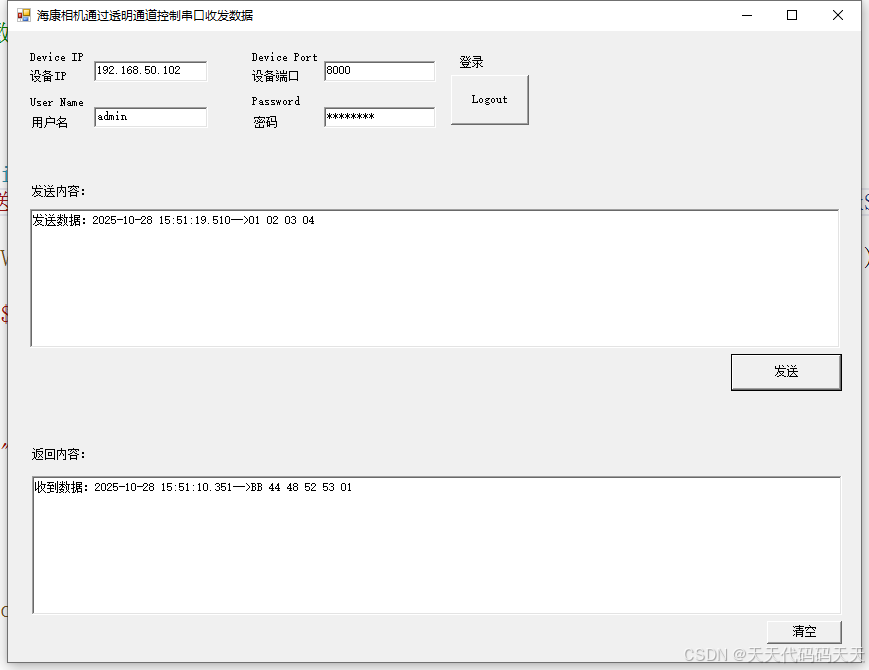
代码
using System;
using System.Runtime.InteropServices;
using System.Windows.Forms;
using static PreviewDemo.CHCNetSDK;
namespace PreviewDemo
{
public partial class frmTest : Form
{
public frmTest()
{
InitializeComponent();
}
private uint iLastErr = 0;
private Int32 m_lUserID = -1;
private bool m_bInitSDK = false;
private bool m_bSend = false;
private bool m_bRecord = false;
private bool m_bTalk = false;
private Int32 m_lRealHandle = -1;
private int lVoiceComHandle = -1;
private string str;
string Protocol = "RS485";
CHCNetSDK.REALDATACALLBACK RealData = null;
CHCNetSDK.LOGINRESULTCALLBACK LoginCallBack = null;
public CHCNetSDK.NET_DVR_PTZPOS m_struPtzCfg;
public CHCNetSDK.NET_DVR_USER_LOGIN_INFO struLogInfo;
public CHCNetSDK.NET_DVR_DEVICEINFO_V40 DeviceInfo;
private void frmLight_Load(object sender, EventArgs e)
{
m_bInitSDK = CHCNetSDK.NET_DVR_Init();
if (m_bInitSDK == false)
{
MessageBox.Show("NET_DVR_Init error!");
return;
}
else
{
//保存SDK日志 To save the SDK log
CHCNetSDK.NET_DVR_SetLogToFile(3, "C:\\SdkLog\\", true);
}
}
private void btnLogin_Click(object sender, EventArgs e)
{
if (textBoxIP.Text == "" || textBoxPort.Text == "" ||
textBoxUserName.Text == "" || textBoxPassword.Text == "")
{
MessageBox.Show("Please input IP, Port, User name and Password!");
return;
}
if (m_lUserID < 0)
{
struLogInfo = new CHCNetSDK.NET_DVR_USER_LOGIN_INFO();
//设备IP地址或者域名
byte[] byIP = System.Text.Encoding.Default.GetBytes(textBoxIP.Text);
struLogInfo.sDeviceAddress = new byte[129];
byIP.CopyTo(struLogInfo.sDeviceAddress, 0);
//设备用户名
byte[] byUserName = System.Text.Encoding.Default.GetBytes(textBoxUserName.Text);
struLogInfo.sUserName = new byte[64];
byUserName.CopyTo(struLogInfo.sUserName, 0);
//设备密码
byte[] byPassword = System.Text.Encoding.Default.GetBytes(textBoxPassword.Text);
struLogInfo.sPassword = new byte[64];
byPassword.CopyTo(struLogInfo.sPassword, 0);
struLogInfo.wPort = ushort.Parse(textBoxPort.Text);//设备服务端口号
if (LoginCallBack == null)
{
LoginCallBack = new CHCNetSDK.LOGINRESULTCALLBACK(cbLoginCallBack);//注册回调函数
}
struLogInfo.cbLoginResult = LoginCallBack;
struLogInfo.bUseAsynLogin = false; //是否异步登录:0- 否,1- 是
DeviceInfo = new CHCNetSDK.NET_DVR_DEVICEINFO_V40();
//登录设备 Login the device
m_lUserID = CHCNetSDK.NET_DVR_Login_V40(ref struLogInfo, ref DeviceInfo);
if (m_lUserID < 0)
{
iLastErr = CHCNetSDK.NET_DVR_GetLastError();
str = "NET_DVR_Login_V40 failed, error code= " + iLastErr; //登录失败,输出错误号
MessageBox.Show(str);
return;
}
else
{
//登录成功
MessageBox.Show("Login Success!");
btnLogin.Text = "Logout";
}
}
else
{
//注销登录 Logout the device
if (m_lRealHandle >= 0)
{
MessageBox.Show("Please stop live view firstly");
return;
}
if (!CHCNetSDK.NET_DVR_Logout(m_lUserID))
{
iLastErr = CHCNetSDK.NET_DVR_GetLastError();
str = "NET_DVR_Logout failed, error code= " + iLastErr;
MessageBox.Show(str);
return;
}
m_lUserID = -1;
btnLogin.Text = "Login";
}
return;
}
public void cbLoginCallBack(int lUserID, int dwResult, IntPtr lpDeviceInfo, IntPtr pUser)
{
string strLoginCallBack = "登录设备,lUserID:" + lUserID + ",dwResult:" + dwResult;
}
public void SerialDataCallBack(int lSerialHandle, string pRecvDataBuffer, uint dwBufSize, uint dwUser)
{
this.Invoke(new Action(() =>
{
byte[] bytes = System.Text.Encoding.Default.GetBytes(pRecvDataBuffer);
string hexString = BitConverter.ToString(bytes).Replace("-", " ");
rtxtRecv.Text = "收到数据:" + DateTime.Now.ToString("yyyy-MM-dd HH:mm:ss.fff") + "-->" + hexString;
}));
}
private void btnSend_Click(object sender, EventArgs e)
{
if (m_lUserID == -1)
{
MessageBox.Show("请先登录!");
return;
}
int iSelSerialIndex = 2; // 1:232串口;2:485串口
int lSerialChan = 1; // 使用485时该值有效,从1开始;232时设置为0
int brightness = 0;
if (Protocol == "RS232")
{
iSelSerialIndex = 1;
lSerialChan = 0;
#region 设置232为透明通道模式(使用232透明通道时调用,485不需要)
uint dwReturned = 0;
NET_DVR_RS232CFG_V30 struRS232Cfg = new NET_DVR_RS232CFG_V30();
// 分配非托管内存
IntPtr ptrRS232Cfg = Marshal.AllocHGlobal(Marshal.SizeOf(typeof(NET_DVR_RS232CFG_V30)));
Marshal.StructureToPtr(struRS232Cfg, ptrRS232Cfg, false);
if (!CHCNetSDK.NET_DVR_GetDVRConfig(m_lUserID, CHCNetSDK.NET_DVR_GET_RS232CFG_V30, 0,
ptrRS232Cfg, (uint)Marshal.SizeOf(typeof(NET_DVR_RS232CFG_V30)), ref dwReturned))
{
MessageBox.Show($"NET_DVR_GET_RS232CFG_V30 错误: {CHCNetSDK.NET_DVR_GetLastError()}");
return;
}
// 将非托管内存转换为结构体
struRS232Cfg = (NET_DVR_RS232CFG_V30)Marshal.PtrToStructure(ptrRS232Cfg, typeof(NET_DVR_RS232CFG_V30));
struRS232Cfg.struRs232.dwWorkMode = 2; // 设置232为透明通道模式;0:窄带传输,1:控制台,2:透明通道
// 将结构体转换回非托管内存
Marshal.StructureToPtr(struRS232Cfg, ptrRS232Cfg, false);
if (!CHCNetSDK.NET_DVR_SetDVRConfig(m_lUserID, CHCNetSDK.NET_DVR_SET_RS232CFG_V30, 0,
ptrRS232Cfg, (uint)Marshal.SizeOf(typeof(NET_DVR_RS232CFG_V30))))
{
MessageBox.Show($"NET_DVR_SET_RS232CFG_V30 错误: {CHCNetSDK.NET_DVR_GetLastError()}");
return;
}
#endregion
}
// 创建回调委托
CHCNetSDK.SERIALDATACALLBACK callback = new CHCNetSDK.SERIALDATACALLBACK(SerialDataCallBack);
// 设置回调函数获取透传数据
m_bSend = CHCNetSDK.NET_DVR_SerialStart(m_lUserID, iSelSerialIndex, callback, (uint)m_lUserID);
if (!m_bSend)
{
MessageBox.Show($"NET_DVR_SerialStart 错误: {CHCNetSDK.NET_DVR_GetLastError()}");
return;
}
// 通过透明通道发送数据
lSerialChan = 1;
byte[] szSendBuf = { 0x01, 0x02, 0x03, 0x04 };
string hexString = BitConverter.ToString(szSendBuf).Replace("-", " ");
rtxtSend.Text = "发送数据:" + DateTime.Now.ToString("yyyy-MM-dd HH:mm:ss.fff") + "-->" + hexString;
if (!CHCNetSDK.NET_DVR_SerialSend(m_lUserID, lSerialChan, szSendBuf, (uint)szSendBuf.Length))
{
MessageBox.Show($"NET_DVR_SerialSend 错误: {CHCNetSDK.NET_DVR_GetLastError()}");
return;
}
else
{
MessageBox.Show("发送成功!");
}
}
private void button2_Click(object sender, EventArgs e)
{
rtxtRecv.Text = "";
}
}
}
using System;
using System.Runtime.InteropServices;
using System.Windows.Forms;
using static PreviewDemo.CHCNetSDK;namespace PreviewDemo
{public partial class frmTest : Form{public frmTest(){InitializeComponent();}private uint iLastErr = 0;private Int32 m_lUserID = -1;private bool m_bInitSDK = false;private bool m_bSend = false;private bool m_bRecord = false;private bool m_bTalk = false;private Int32 m_lRealHandle = -1;private int lVoiceComHandle = -1;private string str;string Protocol = "RS485";CHCNetSDK.REALDATACALLBACK RealData = null;CHCNetSDK.LOGINRESULTCALLBACK LoginCallBack = null;public CHCNetSDK.NET_DVR_PTZPOS m_struPtzCfg;public CHCNetSDK.NET_DVR_USER_LOGIN_INFO struLogInfo;public CHCNetSDK.NET_DVR_DEVICEINFO_V40 DeviceInfo;private void frmLight_Load(object sender, EventArgs e){m_bInitSDK = CHCNetSDK.NET_DVR_Init();if (m_bInitSDK == false){MessageBox.Show("NET_DVR_Init error!");return;}else{//保存SDK日志 To save the SDK logCHCNetSDK.NET_DVR_SetLogToFile(3, "C:\\SdkLog\\", true);}}private void btnLogin_Click(object sender, EventArgs e){if (textBoxIP.Text == "" || textBoxPort.Text == "" ||textBoxUserName.Text == "" || textBoxPassword.Text == ""){MessageBox.Show("Please input IP, Port, User name and Password!");return;}if (m_lUserID < 0){struLogInfo = new CHCNetSDK.NET_DVR_USER_LOGIN_INFO();//设备IP地址或者域名byte[] byIP = System.Text.Encoding.Default.GetBytes(textBoxIP.Text);struLogInfo.sDeviceAddress = new byte[129];byIP.CopyTo(struLogInfo.sDeviceAddress, 0);//设备用户名byte[] byUserName = System.Text.Encoding.Default.GetBytes(textBoxUserName.Text);struLogInfo.sUserName = new byte[64];byUserName.CopyTo(struLogInfo.sUserName, 0);//设备密码byte[] byPassword = System.Text.Encoding.Default.GetBytes(textBoxPassword.Text);struLogInfo.sPassword = new byte[64];byPassword.CopyTo(struLogInfo.sPassword, 0);struLogInfo.wPort = ushort.Parse(textBoxPort.Text);//设备服务端口号if (LoginCallBack == null){LoginCallBack = new CHCNetSDK.LOGINRESULTCALLBACK(cbLoginCallBack);//注册回调函数                    }struLogInfo.cbLoginResult = LoginCallBack;struLogInfo.bUseAsynLogin = false; //是否异步登录:0- 否,1- 是 DeviceInfo = new CHCNetSDK.NET_DVR_DEVICEINFO_V40();//登录设备 Login the devicem_lUserID = CHCNetSDK.NET_DVR_Login_V40(ref struLogInfo, ref DeviceInfo);if (m_lUserID < 0){iLastErr = CHCNetSDK.NET_DVR_GetLastError();str = "NET_DVR_Login_V40 failed, error code= " + iLastErr; //登录失败,输出错误号MessageBox.Show(str);return;}else{//登录成功MessageBox.Show("Login Success!");btnLogin.Text = "Logout";}}else{//注销登录 Logout the deviceif (m_lRealHandle >= 0){MessageBox.Show("Please stop live view firstly");return;}if (!CHCNetSDK.NET_DVR_Logout(m_lUserID)){iLastErr = CHCNetSDK.NET_DVR_GetLastError();str = "NET_DVR_Logout failed, error code= " + iLastErr;MessageBox.Show(str);return;}m_lUserID = -1;btnLogin.Text = "Login";}return;}public void cbLoginCallBack(int lUserID, int dwResult, IntPtr lpDeviceInfo, IntPtr pUser){string strLoginCallBack = "登录设备,lUserID:" + lUserID + ",dwResult:" + dwResult;}public void SerialDataCallBack(int lSerialHandle, string pRecvDataBuffer, uint dwBufSize, uint dwUser){this.Invoke(new Action(() =>{byte[] bytes = System.Text.Encoding.Default.GetBytes(pRecvDataBuffer);string hexString = BitConverter.ToString(bytes).Replace("-", " ");rtxtRecv.Text = "收到数据:" + DateTime.Now.ToString("yyyy-MM-dd HH:mm:ss.fff") + "-->" + hexString;}));}private void btnSend_Click(object sender, EventArgs e){if (m_lUserID == -1){MessageBox.Show("请先登录!");return;}int iSelSerialIndex = 2; // 1:232串口;2:485串口int lSerialChan = 1; // 使用485时该值有效,从1开始;232时设置为0int brightness = 0;if (Protocol == "RS232"){iSelSerialIndex = 1;lSerialChan = 0;#region 设置232为透明通道模式(使用232透明通道时调用,485不需要)uint dwReturned = 0;NET_DVR_RS232CFG_V30 struRS232Cfg = new NET_DVR_RS232CFG_V30();// 分配非托管内存IntPtr ptrRS232Cfg = Marshal.AllocHGlobal(Marshal.SizeOf(typeof(NET_DVR_RS232CFG_V30)));Marshal.StructureToPtr(struRS232Cfg, ptrRS232Cfg, false);if (!CHCNetSDK.NET_DVR_GetDVRConfig(m_lUserID, CHCNetSDK.NET_DVR_GET_RS232CFG_V30, 0,ptrRS232Cfg, (uint)Marshal.SizeOf(typeof(NET_DVR_RS232CFG_V30)), ref dwReturned)){MessageBox.Show($"NET_DVR_GET_RS232CFG_V30 错误: {CHCNetSDK.NET_DVR_GetLastError()}");return;}// 将非托管内存转换为结构体struRS232Cfg = (NET_DVR_RS232CFG_V30)Marshal.PtrToStructure(ptrRS232Cfg, typeof(NET_DVR_RS232CFG_V30));struRS232Cfg.struRs232.dwWorkMode = 2; // 设置232为透明通道模式;0:窄带传输,1:控制台,2:透明通道// 将结构体转换回非托管内存Marshal.StructureToPtr(struRS232Cfg, ptrRS232Cfg, false);if (!CHCNetSDK.NET_DVR_SetDVRConfig(m_lUserID, CHCNetSDK.NET_DVR_SET_RS232CFG_V30, 0,ptrRS232Cfg, (uint)Marshal.SizeOf(typeof(NET_DVR_RS232CFG_V30)))){MessageBox.Show($"NET_DVR_SET_RS232CFG_V30 错误: {CHCNetSDK.NET_DVR_GetLastError()}");return;}#endregion}// 创建回调委托CHCNetSDK.SERIALDATACALLBACK callback = new CHCNetSDK.SERIALDATACALLBACK(SerialDataCallBack);// 设置回调函数获取透传数据m_bSend = CHCNetSDK.NET_DVR_SerialStart(m_lUserID, iSelSerialIndex, callback, (uint)m_lUserID);if (!m_bSend){MessageBox.Show($"NET_DVR_SerialStart 错误: {CHCNetSDK.NET_DVR_GetLastError()}");return;}// 通过透明通道发送数据lSerialChan = 1;byte[] szSendBuf = { 0x01, 0x02, 0x03, 0x04 };string hexString = BitConverter.ToString(szSendBuf).Replace("-", " ");rtxtSend.Text = "发送数据:" + DateTime.Now.ToString("yyyy-MM-dd HH:mm:ss.fff") + "-->" + hexString;if (!CHCNetSDK.NET_DVR_SerialSend(m_lUserID, lSerialChan, szSendBuf, (uint)szSendBuf.Length)){MessageBox.Show($"NET_DVR_SerialSend 错误: {CHCNetSDK.NET_DVR_GetLastError()}");return;}else{MessageBox.Show("发送成功!");}}private void button2_Click(object sender, EventArgs e){rtxtRecv.Text = "";}}
}