
el-upload 上传管理与自定义优化实践
1.问题
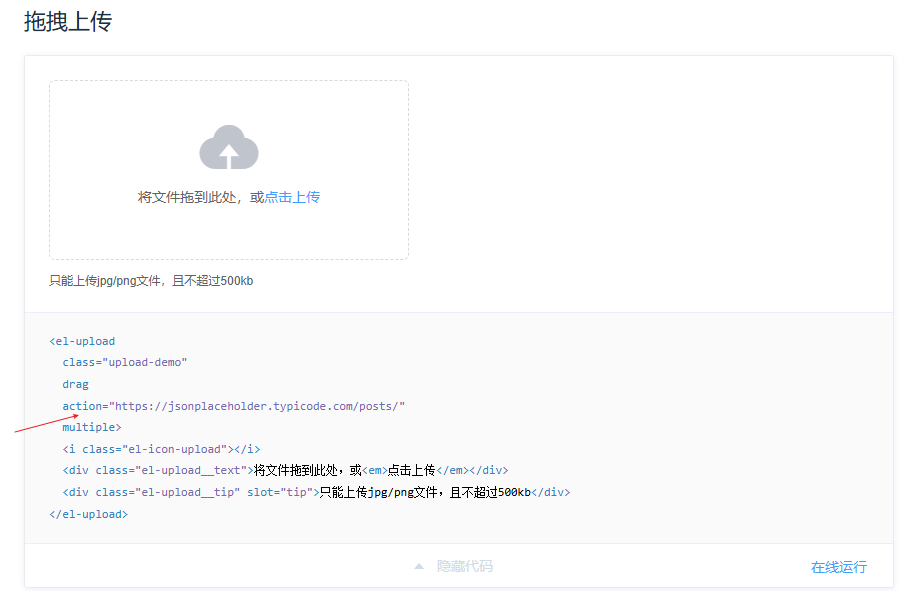
说明:默认情况下,<el-upload> 会将文件提交到 action 属性指定的 URL。如果上传失败,组件仍会回显文件名。在生产环境部署时,如果没有统一为所有请求添加基础路径,<el-upload> 不依赖 Axios,而是直接通过浏览器底层的 XHR 或 Fetch 发起请求。
2.解决方法
2.1默认上传行为
说明:<el-upload> 默认将文件提交到 action 属性指定的 URL。即使上传失败,组件仍会回显文件名。如下:
<template><div class="upload"><!-- 外层容器,用于整个上传组件的布局 --><div class="upload-component"><!-- 上传组件区域 --><el-form :form="form" ref="form" :model="form"><!-- 表单容器,绑定表单对象 form --><el-form-item label="保函扫描件" prop="scanfile" :rules="rules.scanfile"><!-- 表单项,用于扫描件上传 --><!-- label: 显示字段名称 --><!-- prop: 用于表单校验 --><!-- rules: 验证规则 --><el-upload:disabled="isDisabled"                  <!-- 是否禁用上传 -->ref="upload"                             <!-- ref 引用,可用于调用内部方法 -->drag                                     <!-- 支持拖拽上传 -->multiple                                 <!-- 支持多文件上传 -->class="upload-file"                      <!-- 自定义样式类 -->:auto-upload="true"                      <!-- 文件选择后自动上传 -->:show-file-list="false"                  <!-- 不显示默认文件列表 -->:file-list="fileList"                    <!-- 手动维护文件列表 -->:before-upload="beforeUpload"            <!-- 上传前校验函数 -->:accept="accept"                         <!-- 接受的文件类型 -->name="file"                              <!-- 后端接收的字段名 -->:action="fileApi + '/api/file/upload'"   <!-- 上传接口地址 -->:headers="{ Authorization: getToken() }" <!-- 请求头,可传 token -->:on-success="handleSuccess"              <!-- 上传成功回调 -->:on-error="handleError"                  <!-- 上传失败回调 -->><!-- 自定义上传区域内容 --><div :class="{ 'is-disabled': isDisabled }"><i class="el-icon-upload" /><div class="el-upload__text">点击或拖拽文件到此处上传<p>只能上传 jpg、png、pdf 格式,单个文件不超过 10M</p></div></div><!-- 自定义文件列表显示(可选,如果 show-file-list=false 可以自己渲染) --><template #file="{ file }"><div class="upload-file-item"><i class="el-icon-document" @click="openFile(file)" /><span class="file-name" @click="openFile(file)">{{ file.name }}</span><i v-if="!isDisabled"class="el-icon-delete"@click="handleRemove(file)"style="margin-left: 10px; color: #f56565; cursor: pointer;" /></div></template></el-upload></el-form-item></el-form></div></div>
</template>
解决方法如下:
说明:<div v-for="file in fileList"> 自定义文件列表的渲染,其好处是可以完全掌控文件项的结构和样式,灵活实现点击打开文件、删除文件等交互,同时不依赖 <el-upload> 默认的文件列表渲染,便于根据业务需求调整布局、样式和操作逻辑,也可以更方便地处理上传失败时的回显和禁用状态控制。
<template><div class="upload"><!--    <div class="upload-title">{{ title }}</div>--><!--            :auto-upload="true"--><div class="upload-component"><el-form :form="form" ref="form" :model="form"><el-form-item label="保函扫描件" prop="scanfile" :rules="rules.scanfile"><el-upload:disabled="isDisabled"ref="upload"dragmultipleclass="upload-file":show-file-list="false":file-list="fileList":before-upload="beforeUpload":accept="accept"name="file":action="fileApi + '/api/file/upload'":headers="{ Authorization: getToken() }":on-success="handleSuccess":on-error="handleError"><!--            :http-request="mockUpload"--><div :class="{ 'is-disabled': isDisabled }"><i class="el-icon-upload" /><div class="el-upload__text">点击或拖拽文件到此处上传<p>只能上传 jpg、png、pdf 格式,单个文件不超过 10M</p></div></div></el-upload><div v-for="file in fileList" :key="file.uid" class="upload-file-item"><i class="el-icon-document" @click="openFile(file)" /><span class="file-name" @click="openFile(file)">{{ file.name }}</span><i v-if="!isDisabled" class="el-icon-delete" style="margin-left: 10px; color: #f56565; cursor: pointer;" @click="handleRemove(file)" /></div></el-form-item></el-form></div></div>
</template>
2.2生产环境请求方式
说明:在生产环境中,如果未统一设置请求基础路径,<el-upload> 不依赖 Axios,而是直接通过浏览器底层的 XHR 或 Fetch 发起请求。
<el-upload:disabled="isDisabled"ref="upload"dragmultipleclass="upload-file":show-file-list="false":file-list="fileList":before-upload="beforeUpload":accept="accept"name="file":action="fileApi + '/api/file/upload'":headers="{ Authorization: getToken() }":on-success="handleSuccess":on-error="handleError">
data() {return {fileApi: process.env.VUE_APP_FILE_API,}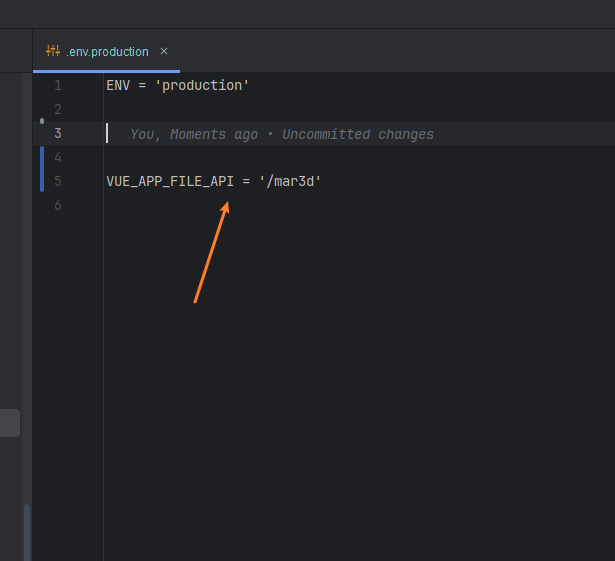
3.源码展示
<template><div class="upload"><!--    <div class="upload-title">{{ title }}</div>--><!--            :auto-upload="true"--><div class="upload-component"><el-form :form="form" ref="form" :model="form"><el-form-item label="保函扫描件" prop="scanfile" :rules="rules.scanfile"><el-upload:disabled="isDisabled"ref="upload"dragmultipleclass="upload-file":show-file-list="false":file-list="fileList":before-upload="beforeUpload":accept="accept"name="file":action="fileApi + '/api/file/upload'":headers="{ Authorization: getToken() }":on-success="handleSuccess":on-error="handleError"><!--            :http-request="mockUpload"--><div :class="{ 'is-disabled': isDisabled }"><i class="el-icon-upload" /><div class="el-upload__text">点击或拖拽文件到此处上传<p>只能上传 jpg、png、pdf 格式,单个文件不超过 10M</p></div></div><!-- 自定义文件展示 --><!--            <template #file="{ file }">--><!--              <div class="upload-file-item">--><!--                <i class="el-icon-document" @click="openFile(file)" />--><!--                <span class="file-name" @click="openFile(file)">{{ file.name }}</span>--><!--                <i v-if="!isDisabled" class="el-icon-delete" @click="handleRemove(file)" style="margin-left: 10px; color: #f56565; cursor: pointer;" />--><!--              </div>--><!--            </template>--></el-upload><div v-for="file in fileList" :key="file.uid" class="upload-file-item"><i class="el-icon-document" @click="openFile(file)" /><span class="file-name" @click="openFile(file)">{{ file.name }}</span><i v-if="!isDisabled" class="el-icon-delete" style="margin-left: 10px; color: #f56565; cursor: pointer;" @click="handleRemove(file)" /></div></el-form-item></el-form></div></div>
</template><script>import request from "@/utils/request";
import {getToken} from "@/utils/auth";
import {parseFileUrls} from "@/utils";
import {hideLoading, showLoading} from "@/utils/loading";
export default {name: 'CustomUpload',props: {flag:{type: Number,default: 0},allData: {type: Object,default: () => {}},getChildFile:{type:Function,default:()=>{}},title: {type: String,default: '保函扫描件'},accept:{type: String,default: '.jpg,.png,.pdf'},maxsize:{type: Number,default: 10}},data() {return {fileApi: process.env.VUE_APP_FILE_API,firstTipShown: false,form:{scanfile: []},rules:{scanfile: [{ required: true, message: '请上传保函扫描件', trigger: 'change' },{validator: (rule, value, callback) => {if (!value || value.length === 0) {callback(new Error('请上传扫描件'))} else {callback()}},trigger: 'change'}]},fileList: []}},computed:{isDisabled() {return  this.$store.state.universal.salaryGuaranteeFlag||this.$store.getters.user.roleLevel.includes(2)},},watch: {allData: {deep: true,immediate: true,handler(val) {if (this.flag === 1 && val.letterScanPath) {this.fileList = parseFileUrls(val.letterScanPath)this.form.scanfile = val.letterScanPathId// this.$emit('before-upload-child', val.letterScanPathId)}}}},mounted() {debuggerif(this.getChildFile){this.getChildFile({validateFieldAsync:this.validateFieldAsync})}},methods: {// parseFileUrlsmockUpload(options){setTimeout(() => {options.onSuccess({"contentType": "application/json","extension": "json","fileId": 3,"fileSize": 186,"objectName": "common/20251031180945/58f57694b16f41208b4284da1d076004.json","originalName": "credentials.json","status": "ACTIVE","url": "http://10.96.136.32:9000/bankfnh/common/20251031180945/58f57694b16f41208b4284da1d076004.json?X-Amz-Algorithm=AWS4-HMAC-SHA256&X-Amz-Credential=bmPQlJW8btDdAV7Rbtdx%2F20251031%2Fus-east-1%2Fs3%2Faws4_request&X-Amz-Date=20251031T100945Z&X-Amz-Expires=604800&X-Amz-SignedHeaders=host&X-Amz-Signature=dee81e4720743a04802dc69460fcadbf ea6b83d5eec183cb659ea365611b2d35"}, options.file)}, 500)},getToken,validateFieldAsync(){let self=thisreturn new Promise((resolve, reject) => {self.$refs.form.validate(valid => {if (valid) {resolve(self.form)}else {reject(false)}})})},handleSuccess(response, file, fileList){// const loading = this.$loading({//   lock: true,                 // 锁定页面滚动//   text: '正在加载中,请稍候...', // 提示文字//   spinner: 'el-icon-loading', // 默认旋转图标//   background: 'rgba(255, 255, 255, 0.8)' // 遮罩背景// })if(this.flag===1 && !this.firstTipShown){this.fileList=[]this.$message({message: '已清空之前的文件,请重新上传',type: 'warning',duration: 3000});this.firstTipShown=true}this.fileList.push(file)this.form.scanfile = this.fileList.map(item => item?.response?.fileId).filter(Boolean).join(',')this.$refs.form.validateField('scanfile')this.$emit('before-upload-child', this.fileList)hideLoading()},handleError(err, file, fileList){hideLoading()this.$message.error(err.message)},uploadFiles(file){const formData = new FormData();formData.append('file', file); // file 是浏览器 File 对象request({url: '/api/minio/upload',method: 'post',data: formData,headers: {'Content-Type': 'multipart/form-data' // Axios 可以自动处理 boundary,也可以不写}}).then(res => {console.log('上传成功', res);}).catch(err => {console.error('上传失败', err);});},beforeUpload(file) {const maxSize = this.maxsize * 1024 * 1024if (file.size > maxSize) {this.$message.error(`文件大小不能超过${this.maxsize}MB`)return false}showLoading("文件上传中...")// debugger// this.uploadFiles(file)// return// this.fileList.push(file)// this.form.scanfile = this.fileList//// this.$refs.form.validateField('scanfile')//// this.$emit('before-upload-child', this.fileList)// return false},handleRemove(file) {this.fileList = this.fileList.filter(f => f.uid !== file.uid)this.form.scanfile = this.fileListthis.$refs.form.validateField('scanfile')},openFile(file) {const url = file.fileUrl || (file ? URL.createObjectURL(file.raw) : '')if (url) window.open(url, '_blank')},}
}
</script><style scoped>.upload-file{width: 100%;
}
:deep(.el-upload.el-upload--text){width: 100%;
}
:deep(.upload-file .el-upload-dragger){width: 100%;height: 100%;
}.is-disabled {cursor: not-allowed;
/*  background-color: #f5f7fa;*/
}
.file-name{cursor: pointer;
}
</style>
4.遮罩函数
说明:通过 loadingInstance 保证同一时间只有一个 Loading 实例,提供 showLoading 方法显示加载中提示和 hideLoading 方法关闭 Loading,使异步操作过程中界面有统一的遮罩效果,避免重复创建 Loading 实例,同时通过 lock 和半透明背景控制交互锁定和视觉效果。
import { Loading } from 'element-ui'let loadingInstance = nullexport function showLoading(text = '正在加载中...') {if (!loadingInstance) {loadingInstance = Loading.service({lock: true,text,background: 'rgba(0, 0, 0, 0.3)'})}
}export function hideLoading() {if (loadingInstance) {loadingInstance.close()loadingInstance = null}
}