Matplotlib数据可视化实战:Matplotlib子图布局与管理入门
Matplotlib多子图布局实战
学习目标
通过本课程的学习,学员将掌握如何在Matplotlib中创建和管理多个子图,了解子图布局的基本原理和调整方法,能够有效地展示多个数据集,提升数据可视化的效果。
相关知识点
- Matplotlib子图
学习内容
1 Matplotlib子图
1.1 创建子图
在数据可视化中,经常需要在一个画布上展示多个数据集,这时就需要使用到子图。Matplotlib提供了多种创建子图的方法,其中最常用的是plt.subplots()函数。这个函数可以一次性创建一个画布和多个子图,并返回一个包含所有子图的数组,使得管理和操作子图变得非常方便。
1.1.1理论知识
plt.subplots()函数的基本语法如下:
%pip install matplotlib
%pip install mplcursors
fig, axs = plt.subplots(nrows, ncols, sharex=False, sharey=False, figsize=(8, 6))
nrows和ncols分别指定了子图的行数和列数。sharex和sharey参数用于控制子图之间是否共享x轴或y轴,这对于需要比较不同数据集的图表非常有用。figsize参数用于设置整个画布的大小,单位为英寸。
1.1.2 实践代码
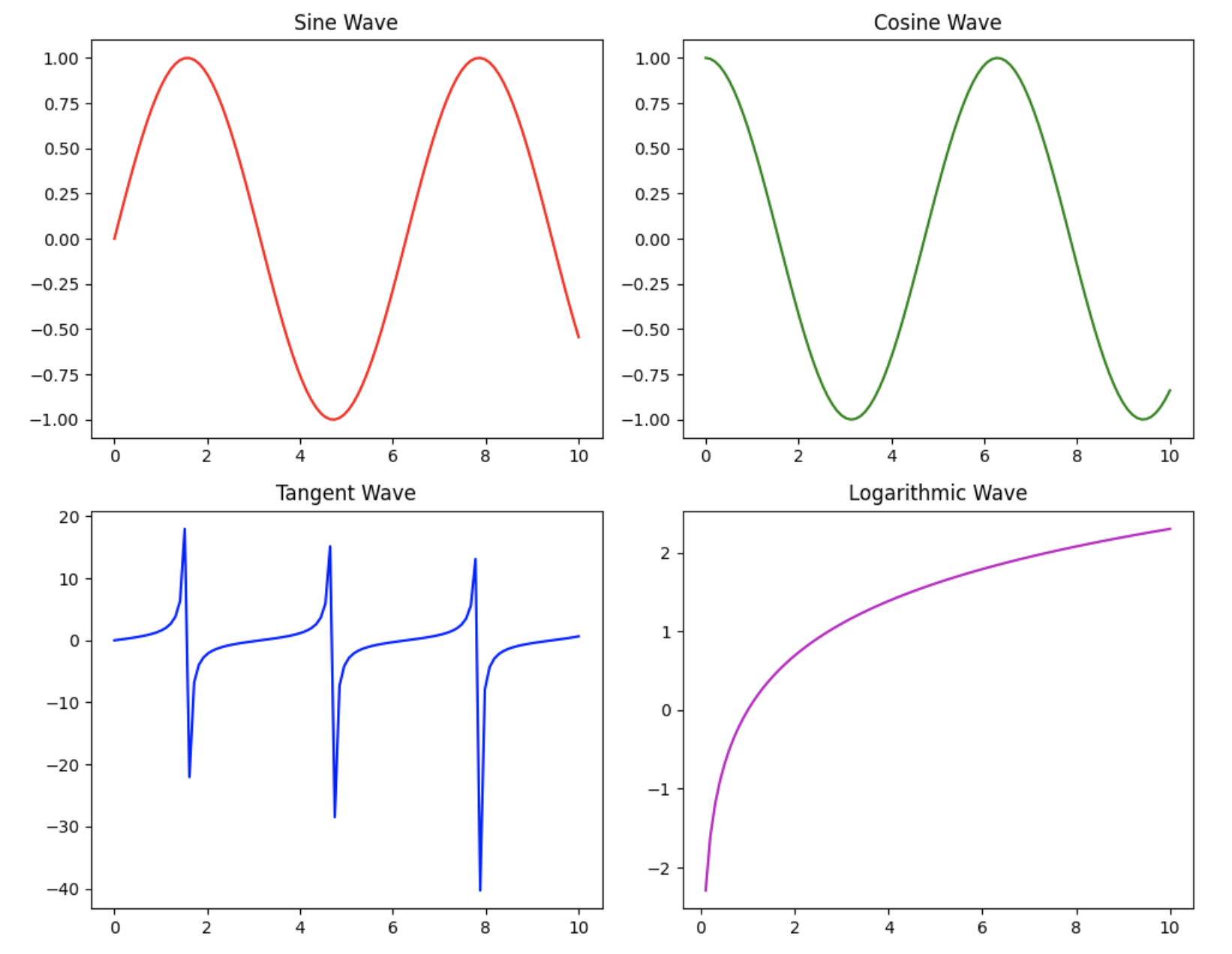
下面的代码示例展示了如何使用plt.subplots()创建一个2x2的子图布局,并在每个子图中绘制不同的数据。
import matplotlib.pyplot as plt
import numpy as np# 创建数据
x = np.linspace(0, 10, 100)
y1 = np.sin(x)
y2 = np.cos(x)
y3 = np.tan(x)
y4 = np.log(x)# 创建2x2的子图布局
fig, axs = plt.subplots(2, 2, figsize=(10, 8))# 绘制子图
axs[0, 0].plot(x, y1, 'r')  # 第一个子图
axs[0, 0].set_title('Sine Wave')
axs[0, 1].plot(x, y2, 'g')  # 第二个子图
axs[0, 1].set_title('Cosine Wave')
axs[1, 0].plot(x, y3, 'b')  # 第三个子图
axs[1, 0].set_title('Tangent Wave')
axs[1, 1].plot(x, y4, 'm')  # 第四个子图
axs[1, 1].set_title('Logarithmic Wave')# 调整布局
plt.tight_layout()# 显示图表
plt.show()
1.2 子图布局调整
虽然plt.subplots()函数提供了一个方便的默认布局,但在实际应用中,可能需要对子图的布局进行更精细的调整,以适应不同的数据展示需求。Matplotlib提供了多种方法来调整子图的布局,包括使用plt.subplots_adjust()函数和GridSpec对象。
1.2.1理论知识
plt.subplots_adjust()函数允许手动调整子图之间的间距,包括左、右、上、下边距以及子图之间的水平和垂直间距。GridSpec对象提供了一种更灵活的方式来定义子图的布局,可以指定每个子图在画布上的具体位置和大小。
1.2.2 实践代码
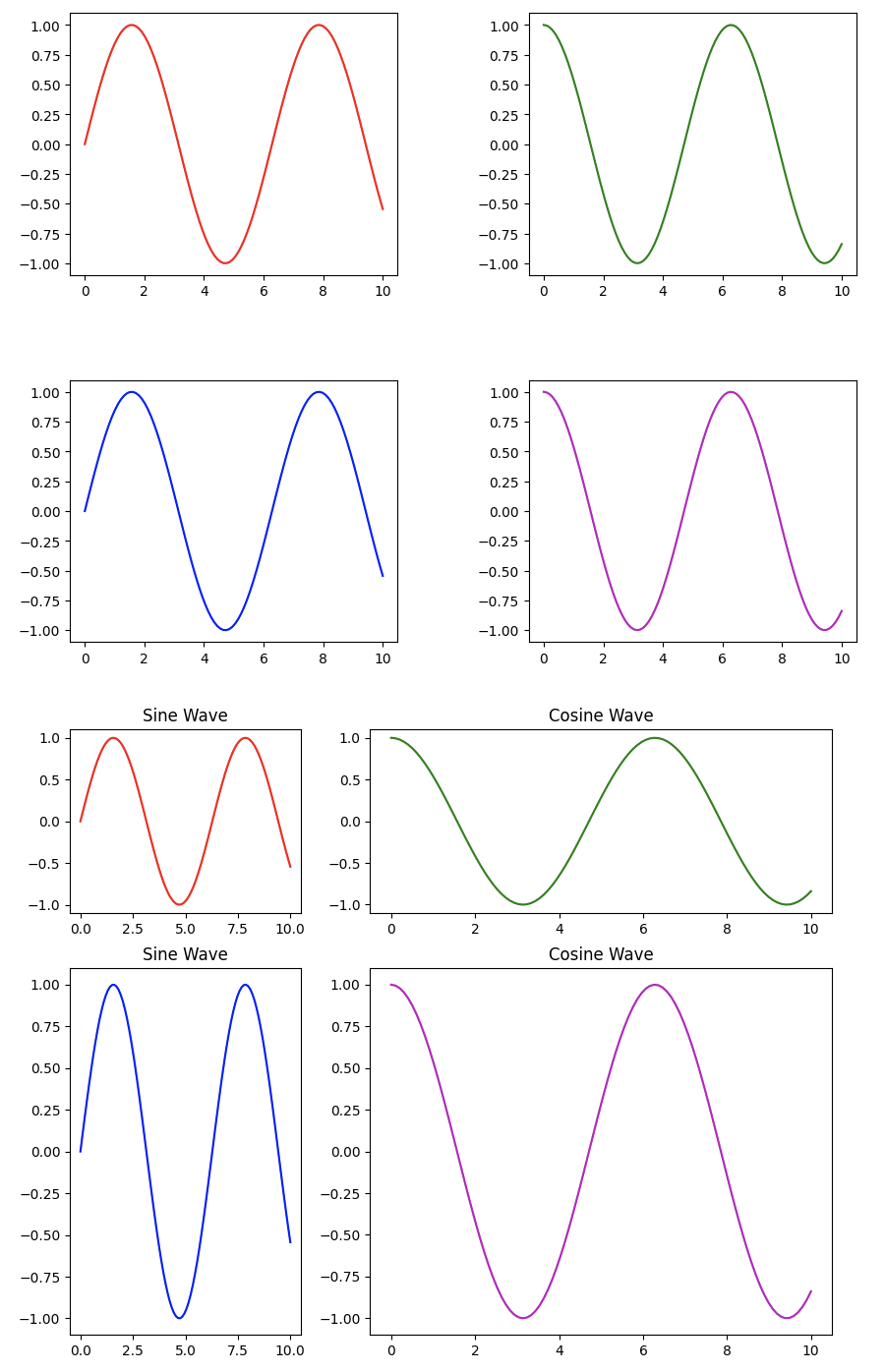
下面的代码示例展示了如何使用plt.subplots_adjust()和GridSpec来调整子图的布局。
import matplotlib.pyplot as plt
import matplotlib.gridspec as gridspec
import numpy as np# 创建数据
x = np.linspace(0, 10, 100)
y1 = np.sin(x)
y2 = np.cos(x)# 使用plt.subplots_adjust()调整布局
fig, axs = plt.subplots(2, 2, figsize=(10, 8))
axs[0, 0].plot(x, y1, 'r')
axs[0, 1].plot(x, y2, 'g')
axs[1, 0].plot(x, y1, 'b')
axs[1, 1].plot(x, y2, 'm')# 调整子图间距
plt.subplots_adjust(left=0.1, right=0.9, top=0.9, bottom=0.1, wspace=0.4, hspace=0.4)# 使用GridSpec调整布局
fig = plt.figure(figsize=(10, 8))
gs = gridspec.GridSpec(2, 2, width_ratios=[1, 2], height_ratios=[1, 2])ax1 = plt.subplot(gs[0, 0])
ax1.plot(x, y1, 'r')
ax1.set_title('Sine Wave')ax2 = plt.subplot(gs[0, 1])
ax2.plot(x, y2, 'g')
ax2.set_title('Cosine Wave')ax3 = plt.subplot(gs[1, 0])
ax3.plot(x, y1, 'b')
ax3.set_title('Sine Wave')ax4 = plt.subplot(gs[1, 1])
ax4.plot(x, y2, 'm')
ax4.set_title('Cosine Wave')# 显示图表
plt.show()
1.3 子图间的交互
在某些情况下,可能需要在多个子图之间实现交互,例如,当鼠标悬停在一个子图上的某个数据点时,其他子图中的相应数据点也会高亮显示。Matplotlib提供了mplcursors库来实现这种交互效果。
1.3.1理论知识
mplcursors库是一个第三方库,可以与Matplotlib结合使用,实现图表的交互功能。通过mplcursors.cursor()函数,可以为图表添加交互式注释,当鼠标悬停在数据点上时,会显示该点的详细信息。
1.3.2 实践代码
下面的代码示例展示了如何使用mplcursors库在多个子图之间实现交互。
import matplotlib.pyplot as plt
import numpy as np
import mplcursors# 创建数据
x = np.linspace(0, 10, 100)
y1 = np.sin(x)
y2 = np.cos(x)# 创建2x2子图
fig, axs = plt.subplots(2, 2, figsize=(10, 8))
lines = []# 绘制各子图
lines.append(axs[0, 0].plot(x, y1, 'r.-', label='Sine Wave 1')[0])
lines.append(axs[0, 1].plot(x, y2, 'g.-', label='Cosine Wave 1')[0])
lines.append(axs[1, 0].plot(x, y1, 'b.-', label='Sine Wave 2')[0])
lines.append(axs[1, 1].plot(x, y2, 'm.-', label='Cosine Wave 2')[0])# 设置标题和图例
axs[0, 0].set_title('Sine Wave 1')
axs[0, 0].legend()
axs[0, 1].set_title('Cosine Wave 1')
axs[0, 1].legend()
axs[1, 0].set_title('Sine Wave 2')
axs[1, 0].legend()
axs[1, 1].set_title('Cosine Wave 2')
axs[1, 1].legend()fig.tight_layout()# 创建交互光标
cursor = mplcursors.cursor(lines, hover=True)@cursor.connect("add")
def on_add(sel):# 获取悬停点的x坐标并找到对应的数据索引hover_x_coord = sel.target[0]actual_data_index = np.argmin(np.abs(x - hover_x_coord))# 设置注释文本current_y_value = sel.artist.get_ydata()[actual_data_index]text_content = (f'{sel.artist.get_label()}\n'f'x = {x[actual_data_index]:.2f}\n'f'y = {current_y_value:.2f}')sel.annotation.set_text(text_content)# 在所有子图中高亮对应点for ax_plot in axs.flat:if ax_plot.lines:line_in_ax = ax_plot.lines[0]line_in_ax.set_marker('o')line_in_ax.set_markersize(12)line_in_ax.set_markevery([actual_data_index])fig.canvas.draw_idle()plt.show()